
Appearance
Book & Renewals — Stewardship Hub
Look after the existing book: see every policy, work renewals before they lapse and find coverage gaps. The header shows Retention, T-60 Watch and Premium.
Used most by: Producers, account managers and CSRs, sales and agency leadership
Active Book
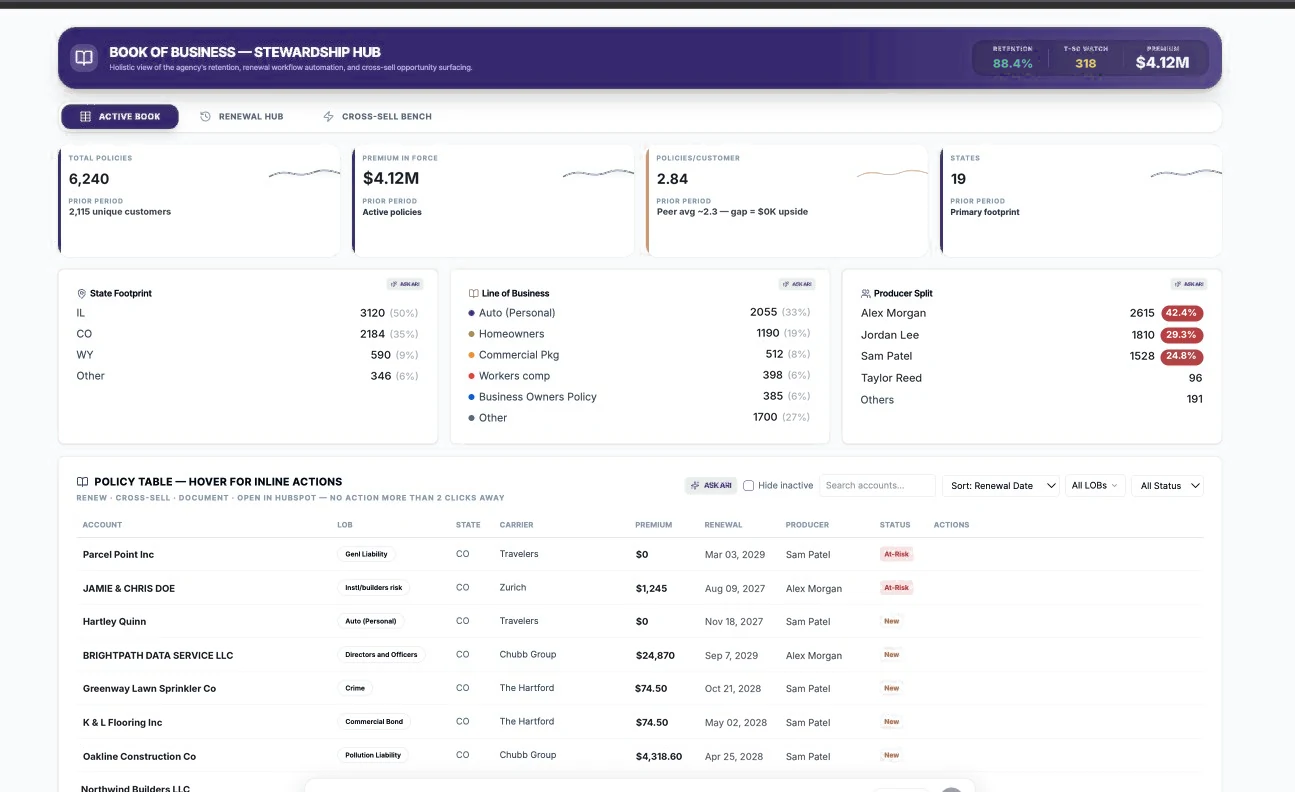
| # | Area | What you see | What you can do |
|---|---|---|---|
| 1 | KPI cards | Total Policies (with unique customers), Premium In Force, Policies/Customer (vs peer average), States | See the size and depth of the book |
| 2 | Splits | State Footprint, Line of Business, Producer Split | ASK ARI on any panel |
| 3 | Policy Table | Account, LOB, state, carrier, premium, renewal date, producer, status | Search accounts, Sort, All LOBs, All Status, Hide inactive |
| 4 | Inline actions | Hover over a row | Renew, Cross-sell, Document, Open in HubSpot |
Look up a client's policies
- Open Book & Renewals › Active Book.
- Type the account name in Search accounts….
- Tick Hide inactive to see only current policies.
- Hover over a policy for actions, or click ASK ARI for a summary of the account.
Renewal Hub
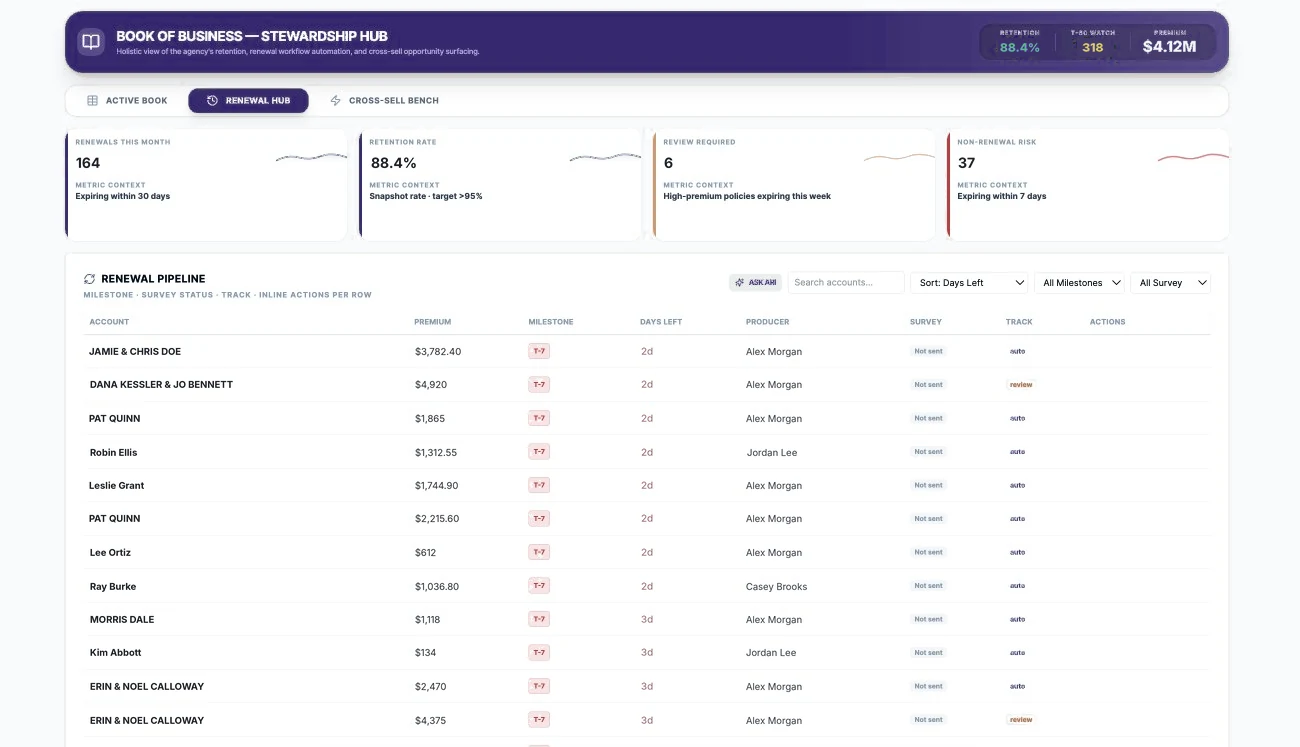
| # | Area | What you see | What you can do |
|---|---|---|---|
| 1 | KPI cards | Renewals This Month, Retention Rate, Review Required, Non-Renewal Risk | Read the metric context (e.g. "Expiring within 7 days") |
| 2 | Renewal Pipeline | Account, premium, Milestone (e.g. T-7), Days Left, producer, Survey status, Track (auto / review), actions | Search; Sort: Days Left; filter All Milestones and All Survey |
| Track | Meaning | What happens |
|---|---|---|
| auto | Low-complexity renewal with no expected changes | Lightweight nudge; appears in Marketing Hub's Auto-Renew Stream |
| review | Higher premium, commercial or changed risk | Needs a producer touch; appears in the Review-Required Stream |
Work this week's renewals
- Open Book & Renewals › Renewal Hub.
- Keep Sort: Days Left so the most urgent renewals are at the top.
- Filter Milestones to the window you are working (for example T-30).
- For each review item, contact the client; for auto items, confirm the nudge has gone out (check Survey status).
- Check Non-Renewal Risk and the Watchlist for accounts close to expiry with no activity.
Cross-Sell Bench
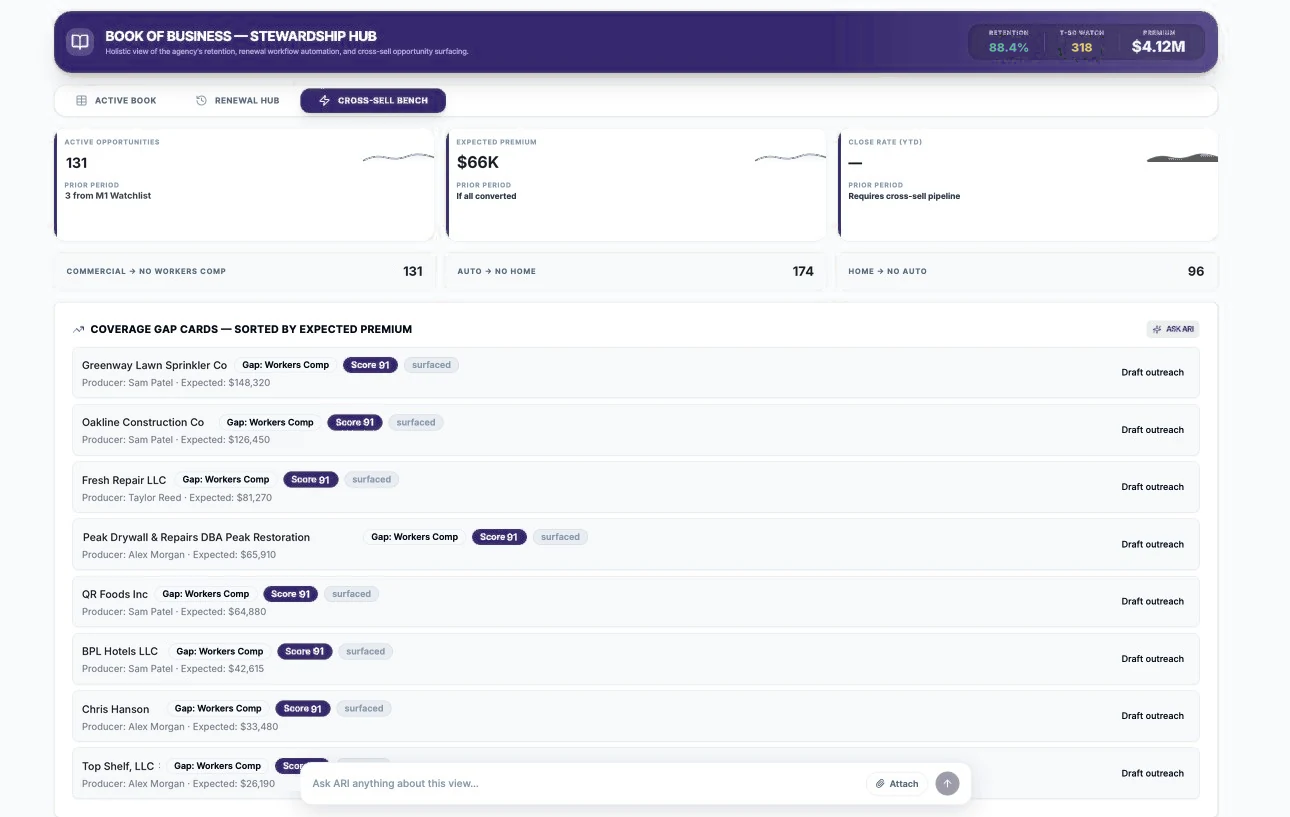
| # | Area | What you see | What you can do |
|---|---|---|---|
| 1 | KPI cards | Active Opportunities, Expected Premium, Close Rate (YTD) | Size of the cross-sell opportunity |
| 2 | Gap patterns | Commercial → No Workers Comp, Auto → No Home, Home → No Auto, with counts | See which gaps are most common |
| 3 | Coverage Gap Cards | Account, gap, score, status, producer, expected premium | Click Draft outreach |
Turn a coverage gap into an opportunity
- Open Book & Renewals › Cross-Sell Bench.
- Pick a card near the top (sorted by expected premium).
- Confirm the gap is real by checking the account in Active Book.
- Click Draft outreach, edit the message and send it.
- Create the opportunity in HubSpot so it appears in the Deal Pipeline.
Coming soon
- Renewal and cross-sell rules configurable by line, premium, state and risk.
- Outcome tracking from outreach to bound policy, so scores improve over time.
- Automatic detection of policies that drop out of the EZLynx data before renewal.