
Appearance
Sales & Marketing — Growth Engine
Manage new-business and renewal pipelines, run lifecycle outreach and find the right prospects. The header shows Pipeline, Weighted pipeline and Win Rate.
Used most by: Head of sales, producers, marketing and growth operations
Deal Pipeline
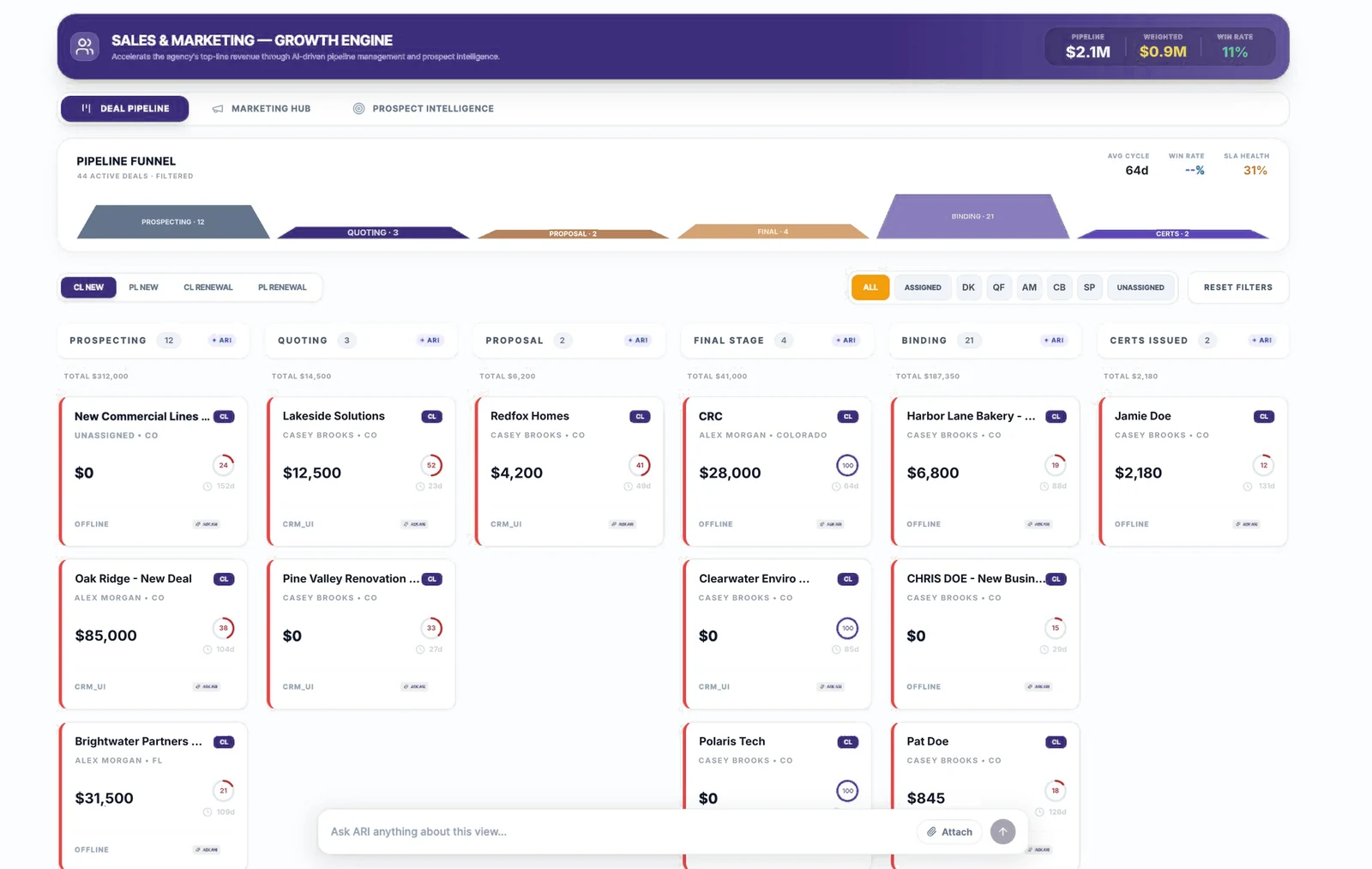
| # | Area | What you see | What you can do |
|---|---|---|---|
| 1 | Pipeline Funnel | Deals by stage, active deal count, Avg Cycle, Win Rate, SLA Health | See where deals are piling up |
| 2 | Pipeline type | CL NEW, PL NEW, CL RENEWAL, PL RENEWAL | Switch between commercial / personal and new / renewal pipelines |
| 3 | Owner filters | ALL, ASSIGNED, producer initials, UNASSIGNED, RESET FILTERS | Show one producer's deals or find unassigned ones |
| 4 | Stage columns | Stage name, deal count, stage total and + ARI | Ask ARI about all deals in a stage |
| 5 | Deal cards | Deal name, line (CL / PL), owner and state, amount, score ring, days open, lead source, ASK ARI | Open a card's ARI chip for next-step advice |
| Pipeline | Stages |
|---|---|
| New business (CL / PL) | Prospecting → Quoting → Proposal → Final Stage → Binding → Certs Issued |
| Renewal (CL / PL) | Survey → Preparing Quote → Waiting on Decision → Final Stage |
Review a producer's pipeline
- Open Sales & Marketing › Deal Pipeline.
- Choose the pipeline type, e.g. CL NEW.
- Click the producer's initials in the owner filter.
- Scan each stage for old deals (days open) and low scores; click ASK ARI on a card for suggested next steps.
- Click RESET FILTERS when done.
Find deals without an owner
- Click UNASSIGNED in the owner filter.
- Assign each deal to a producer in HubSpot; the change appears in INSURAiLABS after the next sync.
Good to know
Deal stages, owners and amounts come from HubSpot. Move deals and update owners in HubSpot for now; INSURAiLABS reflects the change after sync.
Marketing Hub
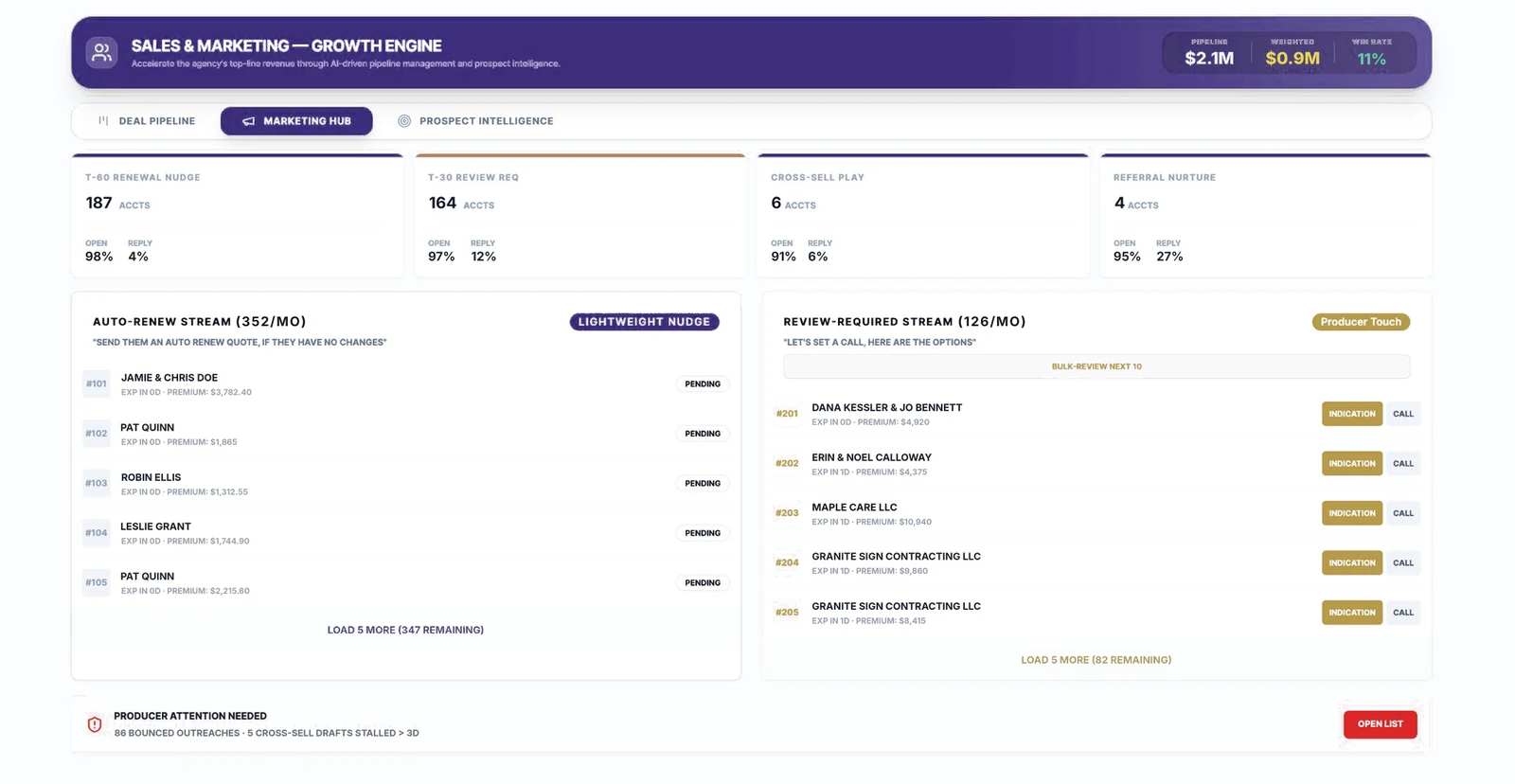
| # | Area | What you see | What you can do |
|---|---|---|---|
| 1 | Program cards | T-60 Renewal Nudge, T-30 Review Req, Cross-Sell Play, Referral Nurture — accounts, open and reply rates | See how each program is performing |
| 2 | Auto-Renew Stream | Renewals suited to a Lightweight Nudge ("send them an auto renew quote if they have no changes") with expiry and premium | Track status; Load 5 more to see further accounts |
| 3 | Review-Required Stream | Renewals that need a Producer Touch ("let's set a call, here are the options") | Use Indication or Call on each account; Bulk-Review Next 10 to work through a batch |
| 4 | Producer Attention Needed | Bounced outreach and stalled drafts | Click Open List to fix them |
Work the review-required renewals
- Open Sales & Marketing › Marketing Hub.
- In Review-Required Stream, start at the top (soonest expiry).
- Click Indication to prepare a quote indication, or Call to schedule a conversation.
- Use Bulk-Review Next 10 to review a batch in one sitting.
Fix bounced or stalled outreach
- In the Producer Attention Needed banner, click Open List.
- Correct contact details for bounced emails in the source system, and finish or discard stalled drafts.
TIP
Judge programs on reply rate and conversions rather than open rate; email privacy features can make open rates look higher than they are.
Prospect Intelligence
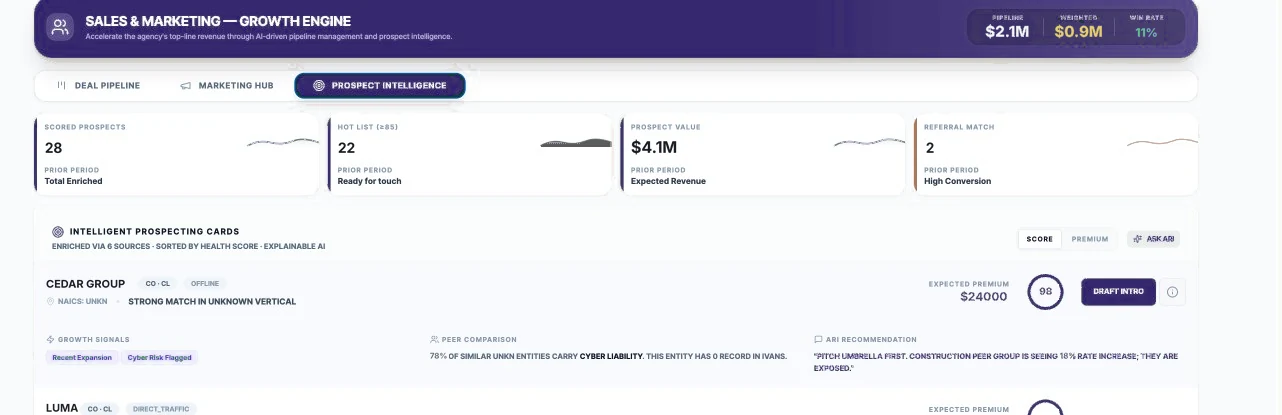
| # | Area | What you see | What you can do |
|---|---|---|---|
| 1 | KPI cards | Scored Prospects, Hot List (≥85), Prospect Value, Referral Match | Size of the opportunity |
| 2 | Intelligent Prospecting Cards | Prospect, state and line, source, NAICS, fit summary, Expected Premium, score | Sort by Score or Premium |
| 3 | Expanded card | Growth Signals, Peer Comparison, ARI Recommendation | Read why the prospect is a fit |
| 4 | Draft Intro | Button on an expanded card | Create a first outreach draft |
Prepare outreach to a hot prospect
- Open Sales & Marketing › Prospect Intelligence and sort by Score.
- Click a prospect to expand it and read the growth signals, peer comparison and ARI recommendation.
- Click Draft Intro.
- Edit the draft so it is accurate and in your voice, then send it from your usual email.
Good to know
Check that the prospect is not already a client or a do-not-contact record before reaching out, and verify signals that look surprising.
Coming soon
- Native pipelines, contacts, tasks, notes and outreach inside INSURAiLABS (HubSpot becomes optional).
- Creating and updating deals directly from INSURAiLABS and from agent suggestions, with an audit trail.
- Consent and suppression controls for automated outreach.